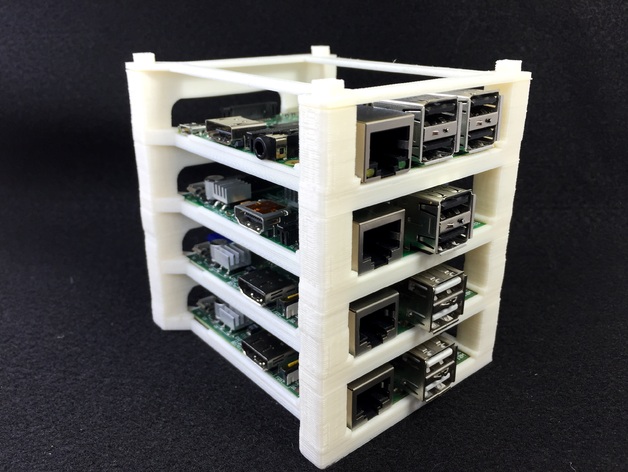
Raspberry Pi Stacking Tower
Source: Thingiverse by wgbartley
The Raspberry Pi Stacking Tower is a free printable 3D model from Thingiverse by wgbartley. This is a minimal yet relatively secure way to stack your Raspberry Pi's vertically. You can download the STL file from the original listing below and print it at home.

About this model
This is a minimal yet relatively secure way to stack your Raspberry Pi's vertically. This is a universal B design in that it works with the original B, the 2 B, and presumably the B+ (I don't have a B+). The design goals were something that was quick, minimal, and held the Pi in place even when cable tension wants to pull it away. To use: 1. Print one "sled" for each Pi. 2. Print one "pi topper" (not really needed, but makes it look better). 3. Remove the SD card from each Pi. 4. Insert the Pi with the SD card slot facing the rear (the rear is the part with the larger wall and missing a bottom support). 5. Gently push each corner of the Pi down past the notches. This may take a little bit of flexing of the printed part but ABS didn't require much work. 6. Re-insert the SD card. 7. When sta…
Frequently asked questions
- Is this 3D model free to download?
- Yes. Raspberry Pi Stacking Tower is free to download from Thingiverse. Open it in the free Thinger app, or use the "Download from Thingiverse" link above to open the original listing.
- Where is the STL hosted?
- The download is hosted by Thingiverse, not by Thinger. We link you directly to the original listing by wgbartley.
- Who made this model?
- Designed by wgbartley, published on Thingiverse. Please credit the creator when sharing your print online.
- Can I print this at home?
- Yes. This model is intended for home FDM and resin 3D printers. Check the original listing for suggested print settings like layer height and supports.
Similar 3D models in Raspberry