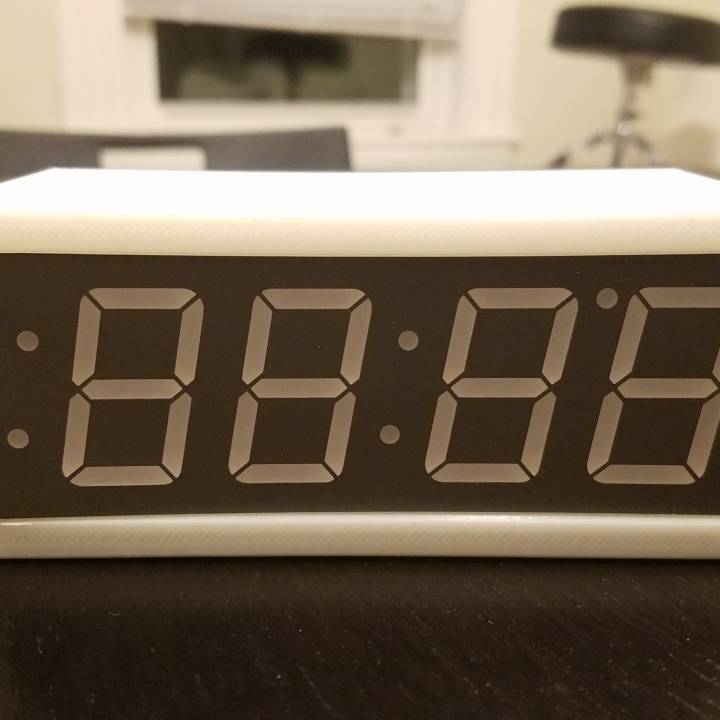
Raspberry Pi Zero Clock
Source: MyMiniFactory by Robert J Sheldon iii
The Raspberry Pi Zero Clock is a free printable 3D model from MyMiniFactory by Robert J Sheldon iii. A Pi Zero Clock? I know what you're thinking, "Isn't a Zero a bit overkill for a clock?" For a normal clock, probably, but with the internet it can be so much more than a normal. You can download the STL file from the original listing below and print it at home.

About this model
A Pi Zero Clock? I know what you're thinking, "Isn't a Zero a bit overkill for a clock?" For a normal clock, probably, but with the internet it can be so much more than a normal clock! You could make a clock that automatically adjusts across time zones based on it's IP address, or perhaps a clock to track your latest amazon order. For me, the clock tells me when the next subway train is coming at my stop. This is a relatively simple build that requires some soldering, but all off-the-shelf components. BOM: a 1.2" 7-segment display from Adafruit in whatever color you want a Raspberry Pi Zero and supported power chord some female to female jumper wires a small wifi dongle, preferably one that you don't have to compile the module for (ahem) (for the non press-fit version) 4 M2.5 screws and 3m…
Frequently asked questions
- Is this 3D model free to download?
- Yes. Raspberry Pi Zero Clock is free to download from MyMiniFactory. Open it in the free Thinger app, or use the "Download from MyMiniFactory" link above to open the original listing.
- Where is the STL hosted?
- The download is hosted by MyMiniFactory, not by Thinger. We link you directly to the original listing by Robert J Sheldon iii.
- Who made this model?
- Designed by Robert J Sheldon iii, published on MyMiniFactory. Please credit the creator when sharing your print online.
- Can I print this at home?
- Yes. This model is intended for home FDM and resin 3D printers. Check the original listing for suggested print settings like layer height and supports.
Similar 3D models in clock



Browse related collections
Gear / Paid link The gear we print with Filament, tools, build plates and the hardware behind the models on Thinger, in one shoppable photo on our Amazon storefront. See the gear → Thinger earns a commission from qualifying purchases made through this link, at no extra cost to you.Filament on sale for your next print
Price drops on Amazon, checked several times a day with 30-day price history.
 YOOPAI Matte PLA+ Filament 1.75mm, 250g Starter Color Bundle, 4 Rolls
$17.99
YOOPAI Matte PLA+ Filament 1.75mm, 250g Starter Color Bundle, 4 Rolls
$17.99
 UGUESS TPU 95A 3D Printer Filament, Black, 1KG, TPU 95A Filament 1.75…
$15.99
UGUESS TPU 95A 3D Printer Filament, Black, 1KG, TPU 95A Filament 1.75…
$15.99
 Creality Silk PLA 3D Printer Filament 1.75mm, 1kg, Gold | High Glossy…
$18.99
Creality Silk PLA 3D Printer Filament 1.75mm, 1kg, Gold | High Glossy…
$18.99
Thinger earns a commission from qualifying purchases made through these links, at no extra cost to you. The price on Amazon at checkout is the one that counts. Israeli buyers: free shipping over $49 deals in Hebrew.